SauceNAO: how to use it (and when to use something else)
SauceNAO is a reverse image search engine built for finding where a picture came from: the “sauce”. It is built for fan art and illustrations. Here is how to use it, how to read its results, what we saw when we tested it on anime frames, and when a different tool is better.
By Tahir Nazir · Updated
In short
SauceNAO is a free reverse image search engine that finds the source of a picture. Upload an image or paste its link and it lists matching artworks with a similarity score and links to the original post or artist. It is built for fan art and illustrations. For a frame from an anime episode, a scene search such as AniTrace gives the exact episode and timestamp.
What is SauceNAO?
SauceNAO is a reverse image search engine. The name comes from the image-board phrase “need to know the source of this now”. It was designed and built by the developer Xamayon, and its search was first made public in October 2008. According to its own about page, it now indexes several billion images from web services, anime, manga, movies, and TV shows.
In practice, people use it for one job: you have a picture with no credit, and you want the artist, the original post, or the series it belongs to.
How do you use SauceNAO, step by step?
- Open saucenao.com in your browser.
- Choose the image file from your device, or paste a link to the image.
- Press the search button and wait for the list of results.
- Look at the similarity percentage on the top results.
- Open the source link on the best match: usually the artist's original post or the series page.
TipUse the largest, least-edited copy of the image you can find. Crops, heavy filters, and added text lower the similarity or hide the match completely.
If a picture is a comic page or a collage, search the panel or the part you care about. Do not crop tighter than that: in our test a crop of the middle quarter of an anime frame found nothing useful on SauceNAO or on trace.moe.
What did SauceNAO find in our tests?
On November 14, 2026 we searched three versions of one anime frame (Demon Slayer, episode 3, one of AniTrace's example scenes) on SauceNAO's website. These are the results it showed:
| What we searched | What SauceNAO showed |
|---|---|
| The clean frame | Demon Slayer, episode 3 “Sabito and Makomo”, estimated time 00:13:44, at 96.41%; the 2019 recap film at 96.23%; and two official posts from April 2019 that shared the same image (93.15% and 91.76%) |
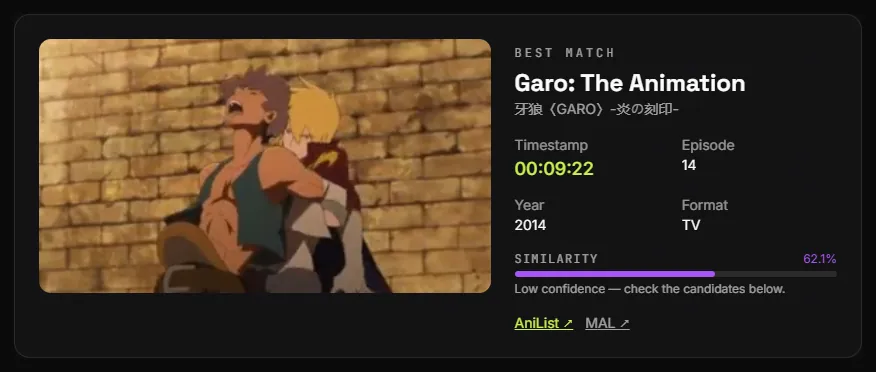
| A posterised copy that looks redrawn | The same anime at 72–73%: the recap film (72.70%), episode 3 (72.54%), and the two posts |
| Only the middle quarter | One unrelated artwork at 45.57%; everything else hidden as low similarity |
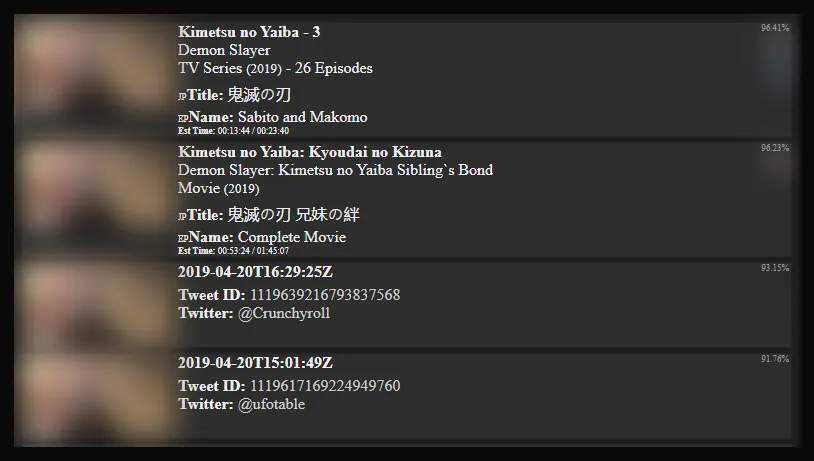
Two lessons. First, SauceNAO's anime index can name the episode and give an estimated time, but trace.moe returned the exact start of the scene, 00:13:43, at 99.99%. Second, SauceNAO held on to the redrawn-looking copy, where the scene search failed:
How do you read SauceNAO's similarity score?
Each result shows how closely it matches your image. A high score with a thumbnail that is clearly the same picture is a real match. A low score is only a look-alike: SauceNAO hides low-similarity results behind a notice for that reason (we saw “Low similarity results have been hidden” on our cropped-frame search), and you can click to show them.
Results also show where the match came from: an anime episode with an estimated time, a post on a social network, or an artwork page with the artist's name. Follow the link on the best match to reach the original.
Always compare the thumbnail with your own image before trusting a result. A different drawing of the same character can look like a match at first glance.
When is SauceNAO the wrong tool?
SauceNAO is built around artworks. For other kinds of pictures, a more specific tool gives a better answer:
| Your picture | Best tool | What you get |
|---|---|---|
| Fan art or an illustration | SauceNAO | The artist and original post |
| A frame from an anime episode or movie | AniTrace (uses trace.moe) | Anime, episode, exact timestamp, preview clip, main characters |
| A manga, manhwa, or webtoon panel | MangaTrace | The series the panel is from |
| Illustrations SauceNAO misses | ascii2d | A second, Japanese search engine for 2D artwork |
| A real-world photo or product | Google Lens | Similar pictures across the web |
For an anime screenshot, SauceNAO can sometimes name the series, but a scene search goes further and tells you the exact second the frame appears. See how to find an anime from a screenshot, or the anime sauce finder for the difference between finding a scene and finding a source.
Why is SauceNAO not working?
When SauceNAO fails, it is usually a search limit, an app without an account key, or a picture that is not in its index. Each case and its fix:
- Search limit reached: free searches are limited. Wait and try again. SauceNAO also offers account upgrades, as its about page mentions; we could not read its account page to confirm the exact limits.
- An app or bot says it is not allowed: SauceNAO's API does not work without an account. When we called it anonymously it answered “The anonymous account type does not permit API usage.” Extensions and bots need an account's API key.
- No results or only low similarity: the picture may be too new, too cropped, or not in any source SauceNAO indexes. Try a larger copy of the image, or ascii2d and IQDB.
- It is an anime screenshot: frames from episodes match better in a scene search. Try AniTrace, or read how trace.moe works.
- Nothing finds it: see 9 fixes for failed anime searches.
What should you do after you find the source?
Credit the artist with a link to the original post when you share the picture, and check the artist's page for their own rules on reposting. A match tells you where a picture appears, not who owns it, so the original post is the place to check.
If the source turns out to be an anime, the watch order builder shows its seasons and films in order, and our tool comparison lists other engines to try for art.
Key takeaways
- On our clean anime frame SauceNAO named the right episode at 96.41%, with an estimated time one second off the exact start.
- It still found the anime (72–73%) in a redrawn-looking copy that a scene search matched to the wrong show.
- Like every engine we tried, it could not match a crop of the middle quarter (45.57%, unrelated).
Frequently asked questions
Is SauceNAO free?
Yes, with limits on how many searches you can run. SauceNAO also offers account upgrades.
What does SauceNAO mean?
It comes from the image-board slang “need to know the source of this now”. “Sauce” is a joke spelling of “source”.
What is a good SauceNAO alternative for anime screenshots?
Use an anime scene search. AniTrace runs on trace.moe and returns the anime, the episode, the exact timestamp, and the main characters. See the full tool comparison.
Can SauceNAO find manga panels?
Sometimes, because its index includes manga. A tool made for panels, such as MangaTrace, is usually a better first try.
Can SauceNAO find the episode of an anime screenshot?
Sometimes. In our test it named Demon Slayer episode 3 with an estimated time of 00:13:44 at 96.41%. A scene search returned the exact start, 00:13:43, at 99.99%.
Sources
- trace.moe — anime scene search engine
- trace.moe API (source code and documentation)
- AniList — anime and character database
- About SauceNAO (official)
- ascii2d
- IQDB multi-service image search
- trace.moe FAQ (why searches fail, what is indexed)
Index size (over 1.7 billion frames) read from trace.moe's API on November 14, 2026.